
See the project summary
See a project on one page in GeotechOS Borehole Logging: holes by type, metres drilled and cored, samples, tests, dates and loggers. Save it as a PDF.
Applies toWindows and macOSWeb browser
The project summary shows the work in a project on one page. Use it for a progress report or an invoice check.
Open the summary
- In the project tree, click the project.
- Click Data › Summary.
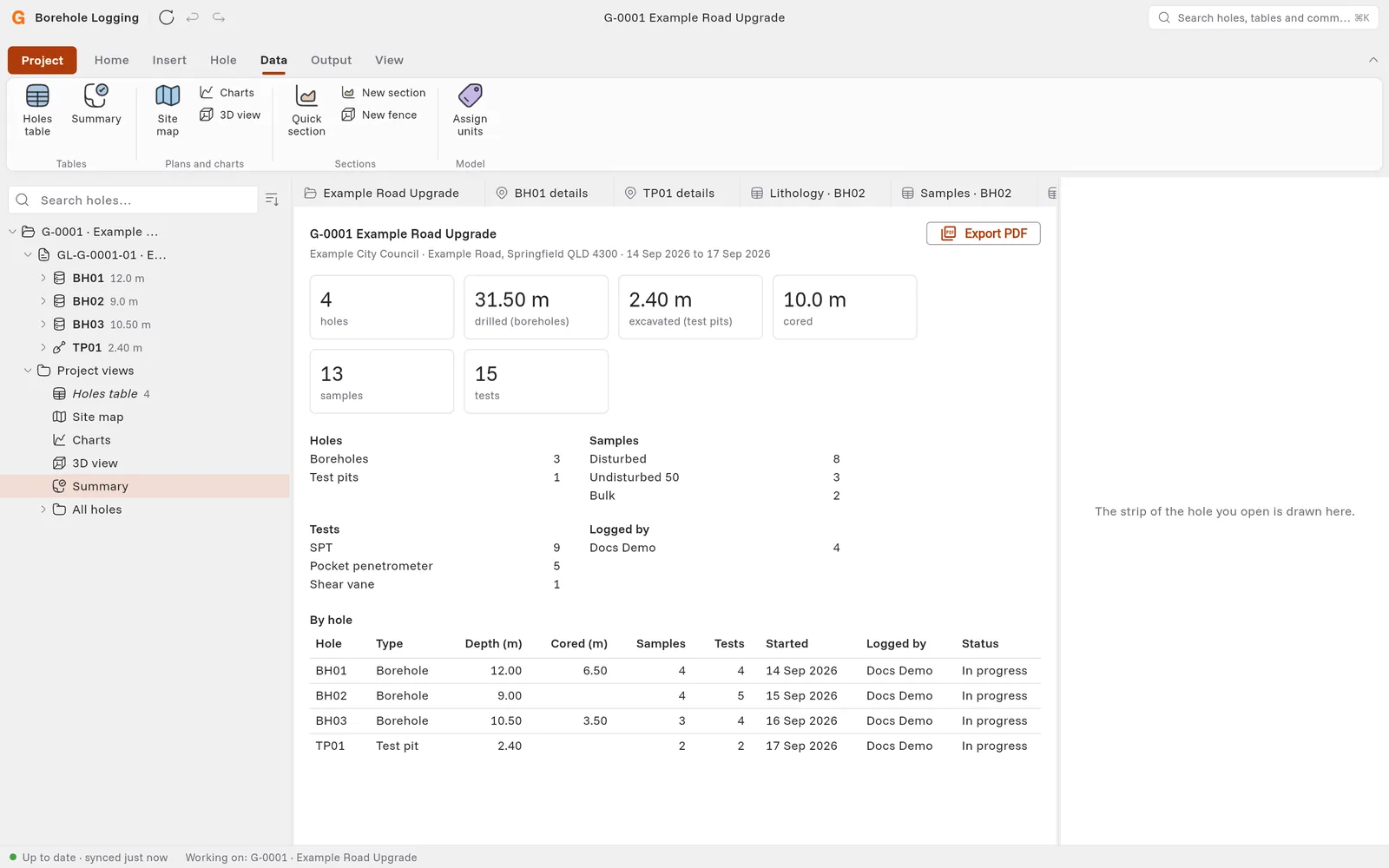
What the summary shows
- The client, the site and the dates of the first and the last hole.
- The number of holes, the metres drilled in boreholes, the metres excavated in test pits and the metres cored.
- The number of samples and tests, and of each type.
- The number of holes that each person logged.
- A table with one row for each hole: the type, depth, metres cored, samples, tests, start date, logger and status.
The summary uses the rows on this computer. Sync first to include the work of other people.
Save the summary as a PDF
Click Export PDF, then save the file.