
Break concrete cylinders and grout cubes
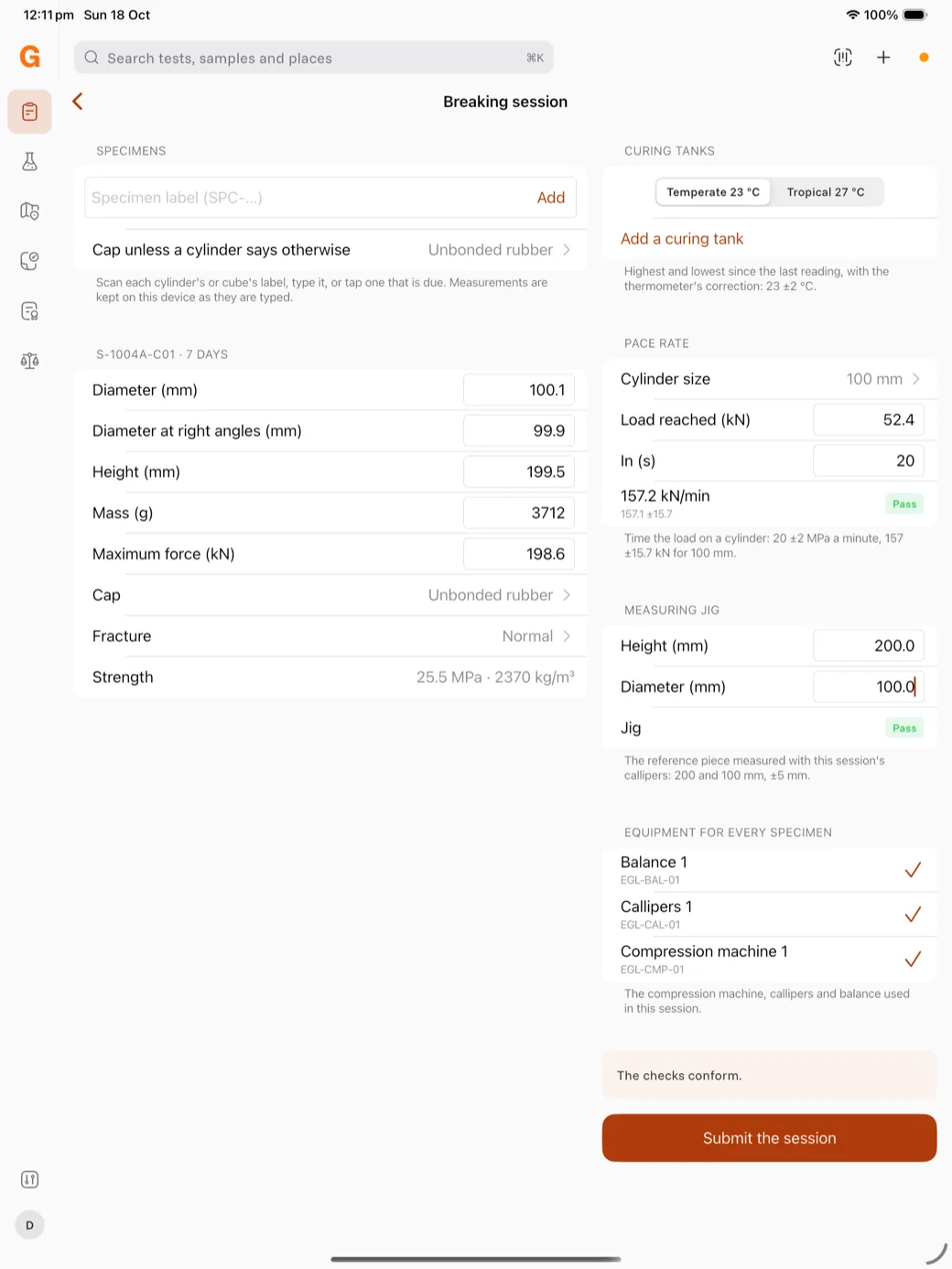
Break concrete cylinders (AS 1012.9) and grout cubes in a breaking session in GeotechOS Lab, with the pace rate and measuring jig checked once for the session.
Applies toWindows and macOSWeb browserPhone and tablet
A breaking session collects the cylinders and cubes that you break at one time. You do the machine checks once. Then you type the measurements of each specimen, and Lab calculates its strength.
Open a breaking session
- iPad: on Today, tap Break specimens. The button shows how many specimens are due today.
- Computer: click Testing › Break cylinders.
Add the specimens
Under Specimens, do one of these:
- Scan the label of the cylinder or cube.
- Type the label, then tap Add.
- Tap a specimen in the list of specimens that are due, for example S-1004A-C01 · 7 days.
Each specimen shows its number and its age in days.
Do the session checks
- Under Curing tanks, record the highest and lowest temperature of each tank since the last reading.
- Under Pace rate, choose the cylinder size. Time the load: type the load reached and the time in seconds. Lab shows the rate and Pass or Fail.
- Under Measuring jig, measure the reference piece with the callipers of this session. Type the height and the diameter.
- Under Equipment for every specimen, tap the compression machine, the callipers and the balance.
If the machine or the jig does not conform, Lab does not let you submit the session.
Type the measurements
For each cylinder, type the two diameters, the height, the mass and the maximum force. Choose the cap and the fracture type. Lab shows the strength and the density, for example 25.5 MPa · 2370 kg/m³.
Submit the session
- Tap Submit the session.
- Tap Submit.
Lab sends each specimen as its own test, with the checks of the session. Each test goes to review.
Note: If no compression machine is registered, Lab tells you. Add the machine in Equipment › Register on a computer, then sync. See Add equipment.