
Site lots for asphalt, coring, deviation and deflection
Test a lot on site in GeotechOS Lab: asphalt by nuclear gauge or cores, surface deviation, deflection and random sampling, worked out as you type.
Applies toPhone and tablet
Some site tests are judged as a lot, not test by test. Lab records all the tests of the lot on one sheet and works out the values of the lot as you type. The lot goes to the server as one record.
The lot sheets
On a site visit, tap the sheet for the work:
| Sheet | What it records |
|---|---|
| Asphalt lot (nuclear gauge) | The field density of each test, the density ratio, the air voids and the characteristic values of the lot (AS/NZS 2891.14.1.2 and 14.5). |
| Asphalt lot (coring) | The density of each core and the characteristic values of the lot. |
| Surface deviation | The deviation of each run under a straightedge, against the limit. |
| Deflection (portable beam) | The deflection of each point and the characteristic deflection of the lot. |
| Random sampling | The random numbers drawn on the device, the place of each site, and whether the lot is homogeneous. |
Record an asphalt lot
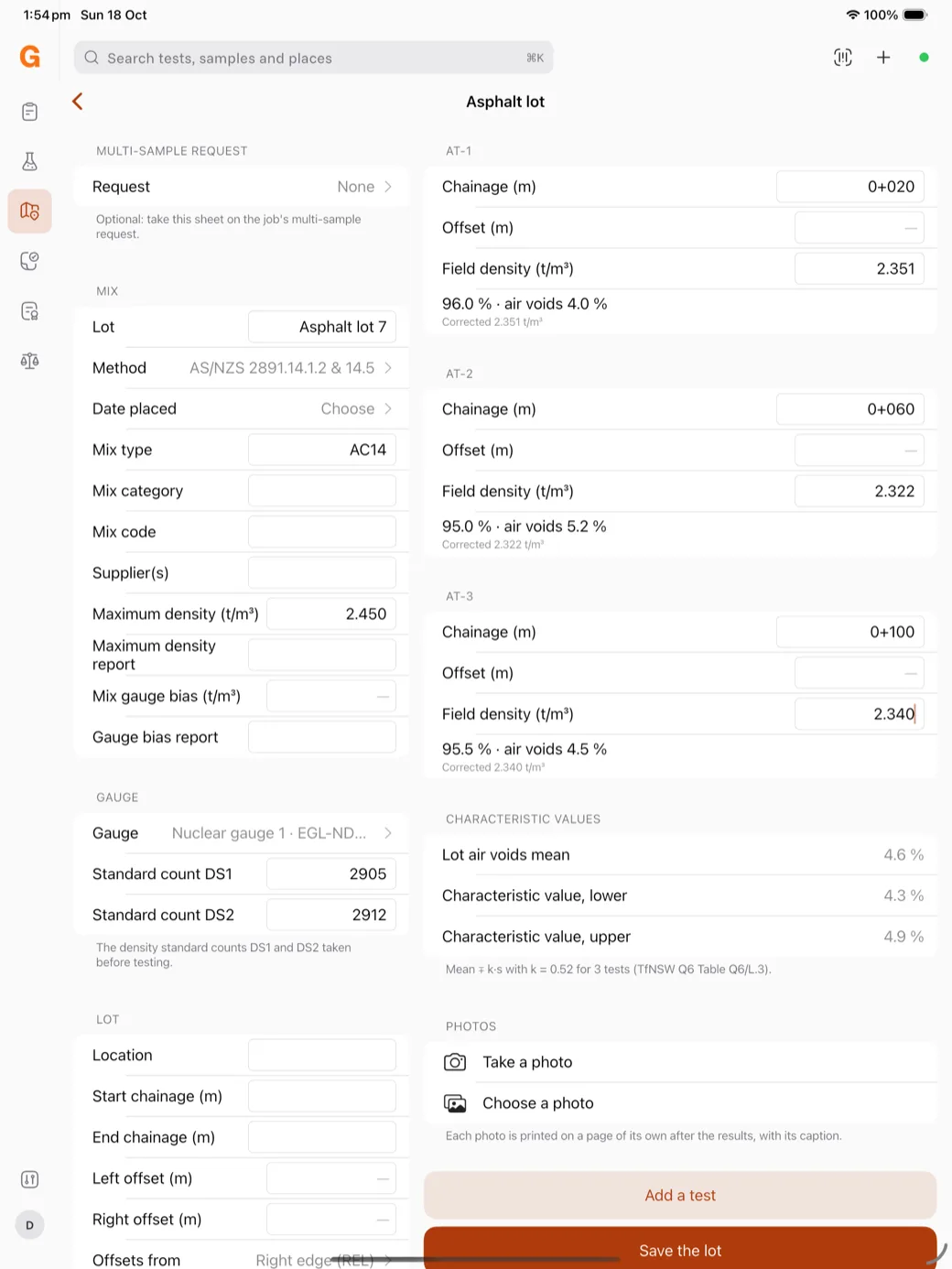
- Tap Asphalt lot (nuclear gauge).
- Under Mix, give the lot a name, choose the Date placed and type the Mix type and the Maximum density (t/m³).
- Under Gauge, choose the gauge and type the standard counts DS1 and DS2.
- Under Lot, type the location and the chainages.
- For each test, type the Chainage and the Field density. Lab shows the density ratio and the air voids, for example 96.0 % · air voids 4.0 %. Tap Add a test for the next test.
Under Characteristic values, Lab shows the mean air voids of the lot and the lower and upper characteristic values. With three or more tests, the values are the mean ∓ k·s (TfNSW Q6 Table Q6/L.3).
Save the lot
Add photos if you need them, then tap Save the lot. Lab sends the lot as one record at the next sync. The server works out each test and the characteristic values again.
To review, authorise and issue the report of the lot, see Release a site lot.