
Field density tests on site
Do a field density test by nuclear gauge or sand replacement in GeotechOS Lab on site, and see the density ratio and the verdict as you type.
Applies toPhone and tablet
You record a field density test on an iPad or a phone at the test site. Lab calculates the dry density, the density ratio and the moisture variation as you type, and judges the test against the specification of the lot (AS 1289.5.4.1).
Before you start
- The office makes the earthworks lots of the project. See Earthworks lots, layers and test locations.
- An MDD test on a sample from the same lot is approved, or the material has assigned values. See Assigned values.
- Sync before you go to site, so that the device has the lots and the approved results.
Start a test
- Tap Site, then tap the site visit, for example G-0001-001.
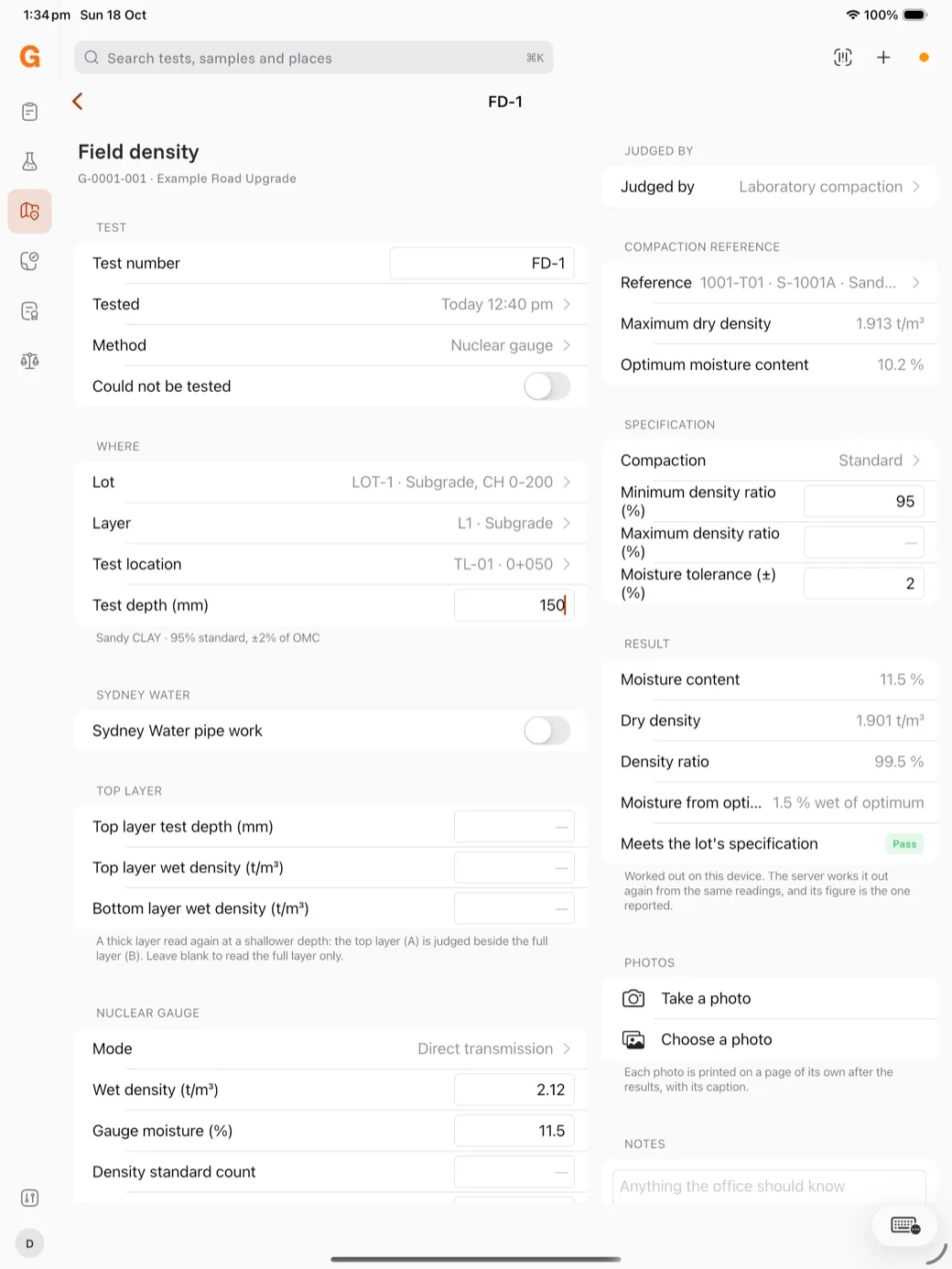
- Tap New field density test. Lab gives the test the next number of the visit, for example FD-1.
- Check the Tested time and choose the Method: Nuclear gauge or Sand replacement.
If the test cannot be done, for example because of rock or water, turn on Could not be tested and type the reason.
Say where the test is
Under Where, choose the Lot, the Layer and the Test location. Type the Test depth (mm).
The line under the group shows the material and the specification of the lot, for example Sandy CLAY · 95% standard, ±2% of OMC.
For a Sydney Water pipe, turn on Sydney Water pipe work and record the pipe type, the support and the traffic.
Choose the compaction reference
Under Compaction reference, tap Reference and choose the approved MDD result. The results from the lot of the test are at the top.
Caution: If the reference is from another lot, or its sample has no lot, Lab tells you before you save. The server refuses a reference that is not from the lot of the test. Choose a reference from the same lot.
Type the readings
- Nuclear gauge: choose the mode and type the Wet density and the Gauge moisture. Type the standard counts.
- Sand replacement: type the masses and the sand calibration.
Under Result, Lab shows the moisture content, the dry density, the Density ratio and the Moisture from optimum, for example 1.5 % wet of optimum. The last line shows Meets the lot's specification with Pass, or Does not meet with Fail.
Save the test
Add photos if you need them, then tap Save test. Lab sends the test at the next sync. The server calculates the result again from the same readings.