
Make a laboratory test report
Make a test report in GeotechOS Lab from approved results. Pick the results, preview the PDF, and submit the report for approval.
Applies toWindows and macOSWeb browserPhone and tablet
A report holds approved results. You make it, a second person approves it, and then it is issued.
Make the report
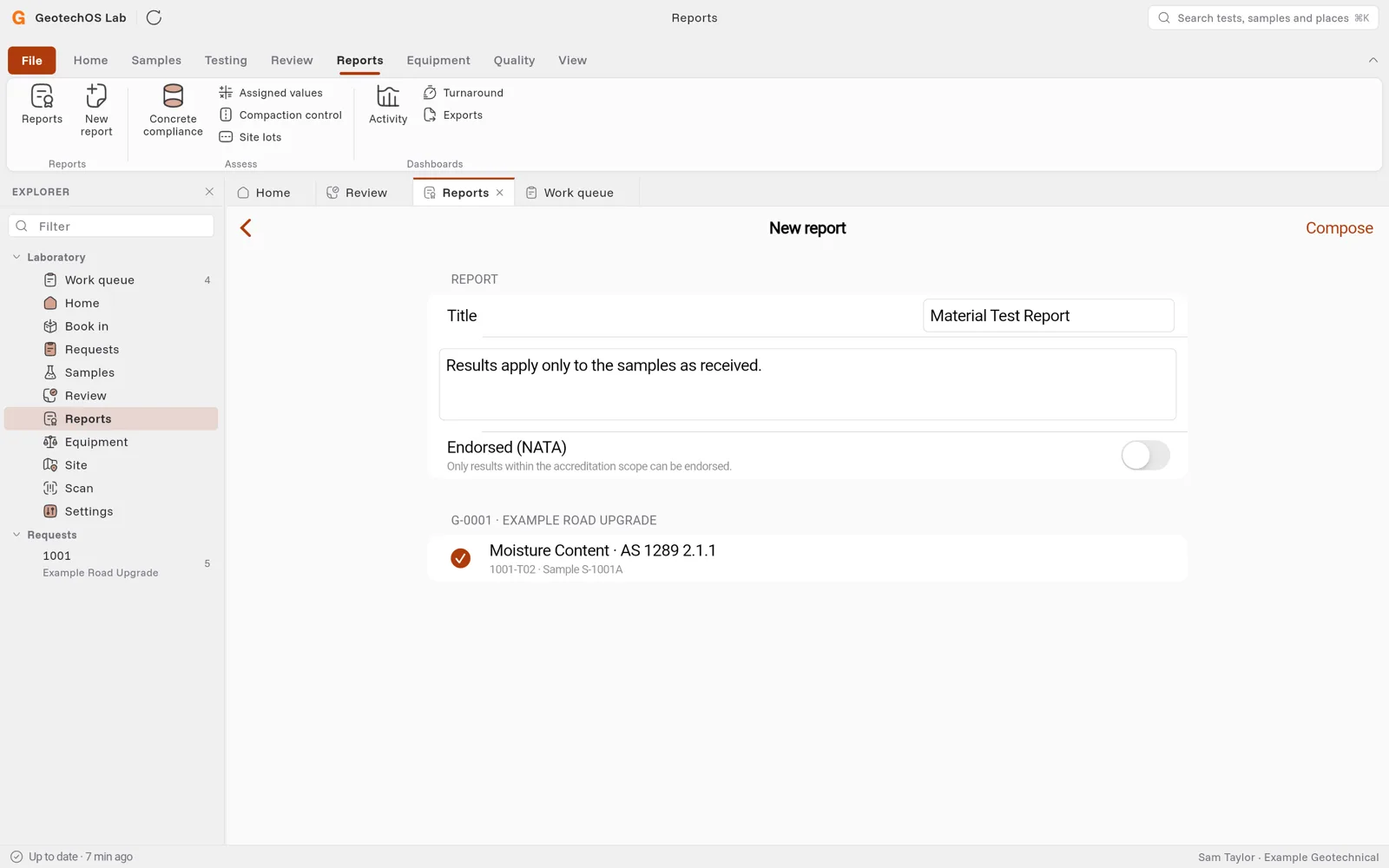
- Click Reports › New report.
- In Title, keep Material Test Report or type another title.
- Change the notes if you need. The notes are printed on the report.
- Turn on Endorsed (NATA) if the report is to carry your accreditation. Only results within your accreditation scope can be endorsed.
- Select the results to report. They are grouped by project.
- Click Compose. Lab makes the report as a Draft, with its number, for example G-0001-1.
Report numbers
The first report on a project takes the project number and the next number in sequence, for example G-0001-1. A later report on the same job takes the next letter, for example G-0001-1A.
Preview the report
Click Preview the PDF. Lab shows the report marked PREVIEW · NOT ISSUED.
Check the project, the job, the sample number, where and when the sample was taken, the material and each result.
Submit for approval
Click Submit for approval. The report shows Awaiting approval.
Note: You cannot approve a report that you made. Lab shows Waiting for an approver until someone else approves it.