
Find your work in the work queue
Find the tests to do today in GeotechOS Lab. Use the work queue on a computer or Today on an iPad, grouped by overdue, due today, waiting and coming up.
Applies toWindows and macOSWeb browserPhone and tablet
The work queue shows the open tests of your laboratory, grouped by what to do first.
On a computer
- Click Home › Work queue, or press Ctrl+1.
- Click To do, In review or All.
- Click a test. The inspector shows its job, due date, progress and sample.
- Double-click the test, or click Open the test, to open its worksheet.
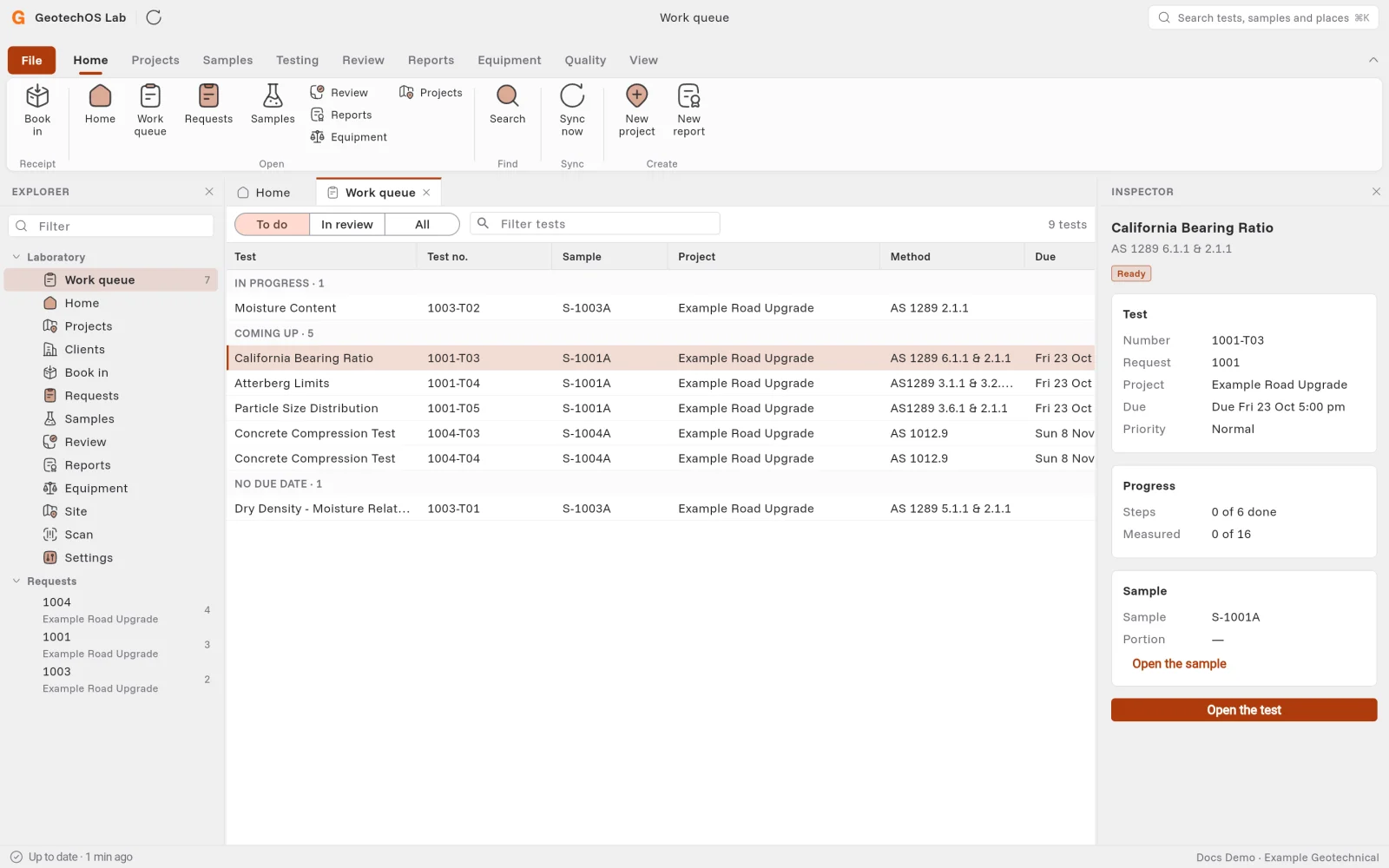
To see only one job's tests, click the job under Requests in the explorer.
On an iPad
Tap Today in the rail. Tap a test to open it beside the list.
The groups
| Group | What it holds |
|---|---|
| Returned to you | A reviewer sent the test back. Read why, then correct it. |
| Overdue | The due date is past. |
| Due today | Due by the end of today. |
| In progress | Started and not submitted. |
| Waiting | A CBR in its soak, or a test that waits for another test's result. The row says what it waits for. |
| Coming up | Due later. |
| No due date | The job has no due date. |
| Blocked | The test cannot go on. Open it to see why. |